
No result found
Please try rephrasing your search
How do I search and filter job listings?
Find available jobs and narrow results using search and filters.
Go to All Jobs to view available job listings.
Search by skill, designation, company name, location, or experience level.
Filter by employment type, work type, salary range, and currency.
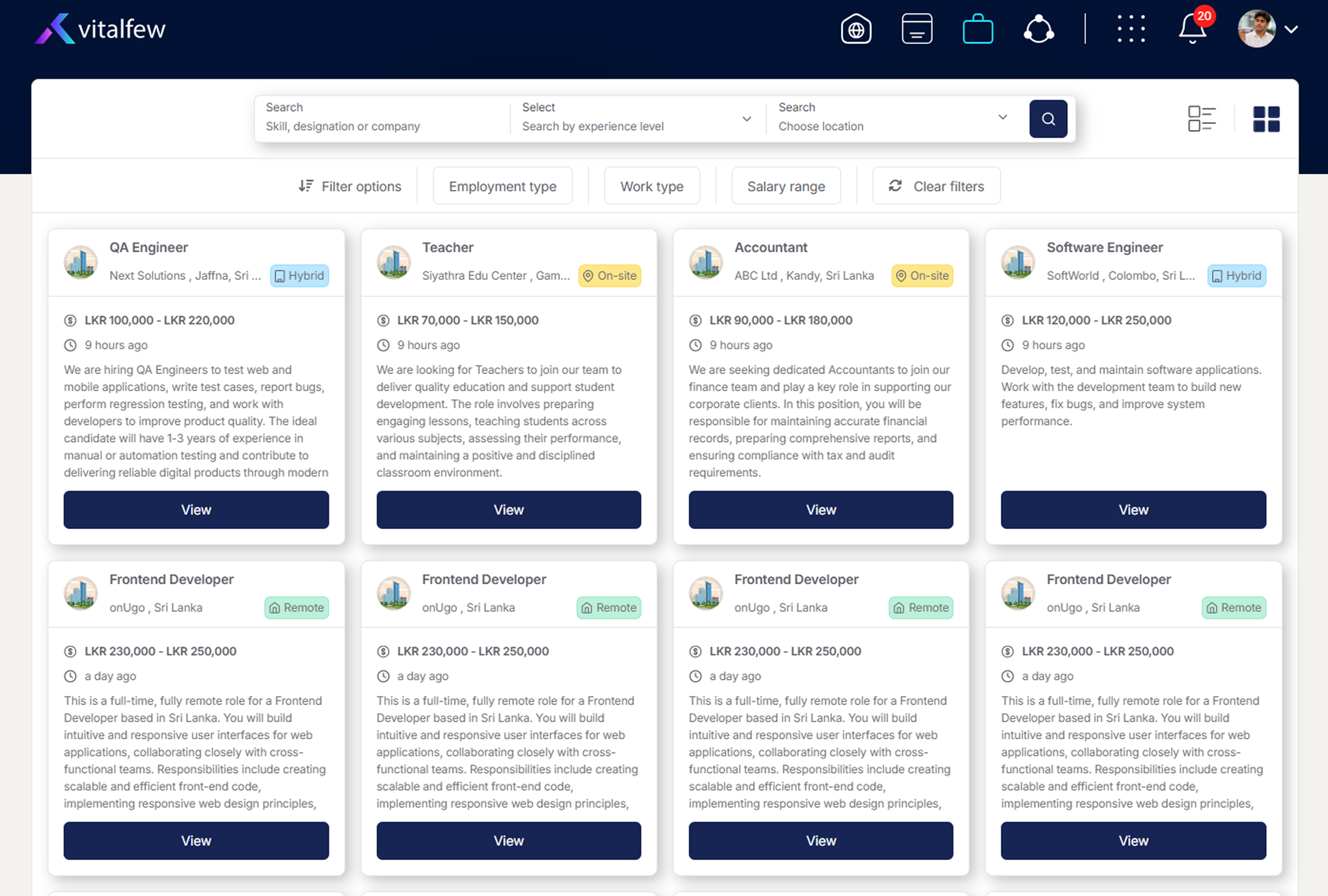
The All Jobs page shows available job listings on VitalFew. You can browse the listings first, then use search and filters to narrow the results based on what you are looking for.
You can search by skill, designation, company name, location, or experience level. You can also filter listings by employment type, work type, salary range, and currency.
Employment type filters may include apprenticeship, casual, contract, freelance, full-time, internship, part-time, temporary, and volunteer. Work type filters may include remote, on-site, and hybrid.
Once you find a suitable role, open the job details page and review the advert before applying. To continue, go to How do I apply for a job? before submitting your application.
If you want to prepare your application materials first, use Resume Management to view your saved resumes. You can also learn about role-aligned resumes in What is job matching for a tailored resume? before applying.
Frequently Asked Questions
{{ faq.a }}