
No result found
Please try rephrasing your search
How do I review screening results?
Review match percentages and candidate insights before shortlisting.
From your advert, open the Screened tab to see completed results.
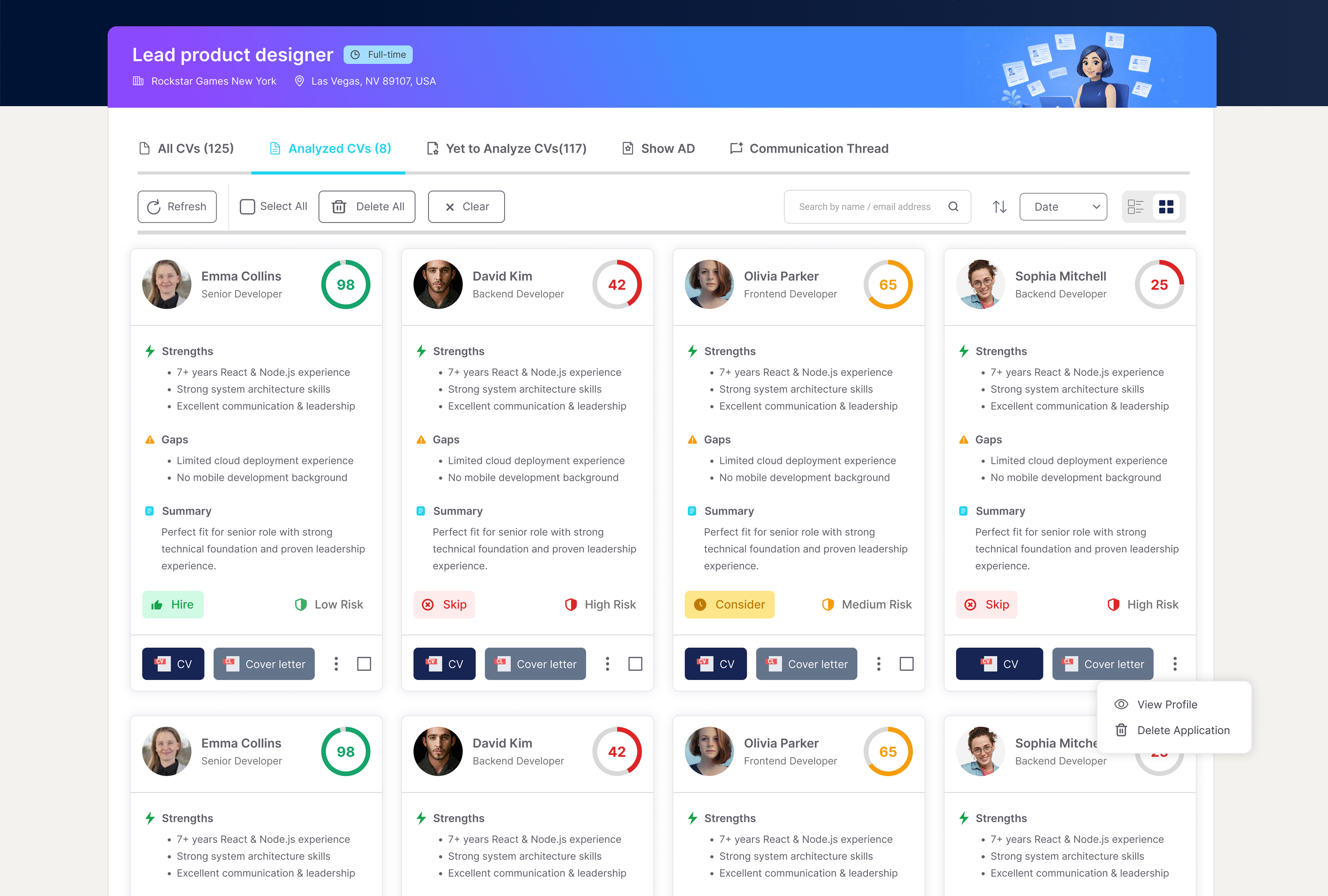
Review the percentage shown on each candidate card.
Check the candidate's strengths, weaknesses, concerns, and overview.
Extra information
Results are saved under the Screened tab for the advert they belong to, so you can return to them at any time. Each card shows a match percentage, with stronger matches highlighted in green and weaker ones in red.
Strengths are where the candidate matches the role. If a candidate fits well, we tell you why. Weaknesses are gaps against what the role needs. Concerns are practical points that could affect fit. The overview summarises the result.
At the foot of each card, a fit label summarises how well the candidate suits the role.
Use the dropdown to sort by results, date received or use the search bar to search by name or email.
From a result, you can open the resume or cover letter, view the candidate's profile, message the candidate, or delete the resume.
To screen resumes for an advert, see How do I screen resumes? To understand what the match percentage is based on, see How does Resume Screening work?
Frequently Asked Questions
{{ faq.a }}